


Running a service business is already a full-time job before you add the admin on top of it. Confirming appointments manually. Chasing no-shows. Answering the same booking questions through texts and DMs while you’re in the middle of actually doing the work. At some point, the coordination overhead stops being manageable and starts being the thing that makes you dread Mondays.
That’s usually when people go looking for booking software. And that’s also when a lot of people make a choice they end up regretting three weeks in, because they picked something based on a top ten list that wasn’t written with their specific type of business in mind.
Appointment scheduling software for service businesses isn’t one-size-fits-all. The features that matter to a solo esthetician working from a rented room are completely different from what a multi-staff salon needs. The platform that works beautifully for a wellness studio might be clunky and overengineered for a barber working independently.
Knowing what your setup actually requires before you evaluate anything is the difference between finding something that genuinely helps and switching platforms six months from now. That’s what this is here to help you figure out.
Why Most Generic Scheduling Tools Let Service Businesses Down
Scheduling software built for broad markets tends to disappoint service businesses for a predictable reason. It’s designed to serve everyone from dental clinics to corporate training companies, which means the feature set is either too bloated with things you’ll never use or frustratingly missing the specific things you actually need.
Service businesses have particular requirements that generic platforms handle inconsistently. Variable appointment lengths that change by service type. Deposit collection that’s enforced at booking rather than requested politely afterward. Cancellation policies that hold without you having to step in and have the conversation. Buffer time between appointments that doesn’t require workarounds. These aren’t premium features. They’re the baseline of what running a real service business requires.
The businesses that find scheduling software genuinely transformative are almost always the ones that are evaluated based on their actual workflow rather than interface aesthetics or price point. Understanding what to look for before you start is the first real step. This guide on key features of appointment scheduling software breaks down exactly what questions to ask before committing to any platform.
What Service Businesses Actually Need From Booking Software
Client-Facing Simplicity First
The most overlooked evaluation step is going through the booking process as a client before looking at anything on the admin side. How many steps does it take? Does it work properly on a phone? Is there an unnecessary account creation step? Every moment of friction in the client-facing flow is a booking that doesn’t get completed.
Good scheduling tools for service businesses make the client experience feel effortless. A clean mobile-optimized page, minimal required fields, immediate confirmation, and nothing that makes someone second-guess finishing the process. If you hesitate anywhere during a test booking, your clients will too.
Automated Reminders That Actually Reduce No-Shows
For anyone operating independently, whether you’re managing a salon booth rental or seeing clients in a private wellness space, a no-show isn’t just a gap in the schedule. Its revenue was already mentally allocated, and then it didn’t arrive.
Automated reminders are the single most impactful feature that most service businesses can add to their workflow. A message the day before. Another few hours out. Most no-shows happen because people forget, not because they don’t intend to come. A well-timed reminder closes that gap without any effort on your end.
This blog on appointment scheduling auto improving productivity ,goes deeper into exactly how much time this frees up across a full week.
Real-Time Calendar Sync
Your booking system and your personal calendar need to be in constant two-way communication. When they aren’t, double bookings happen. Not if. When. Real-time sync with Google Calendar, Outlook, or Apple Calendar should be a baseline expectation of any service business’s booking system worth using, not a premium-tier feature.
Deposits and Payment at the Point of Booking
There is a consistent behavioral difference between a client who has paid something to hold a slot and one who hasn’t. The one who paid shows up. For service providers working in spaces with real per-hour costs attached, this matters more than it might seem on paper.
How Different Business Types Should Think About Scheduling Tools
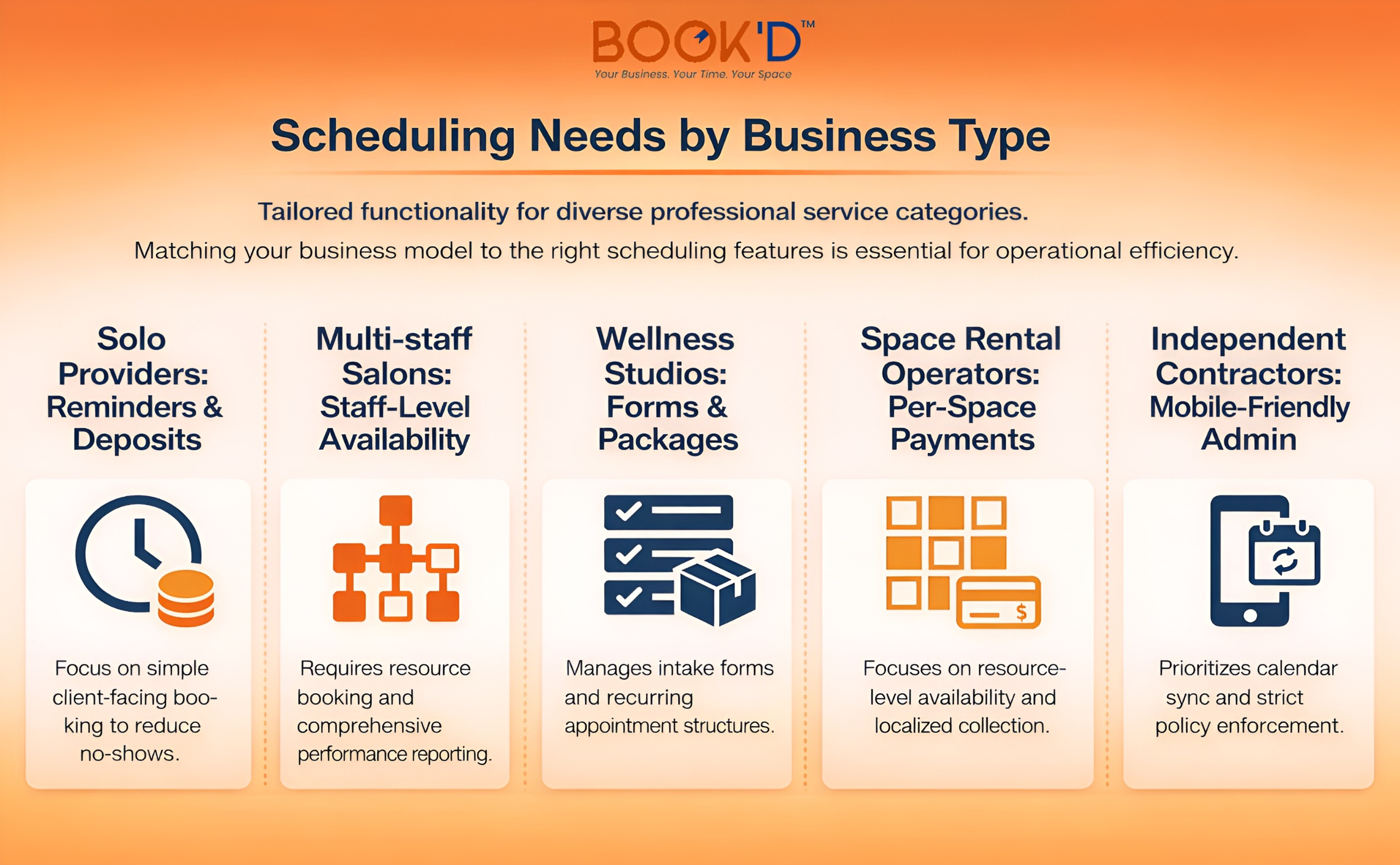 Not every service business has the same setup, and the right platform depends heavily on how yours is structured.
If your setup involves multiple bookable spaces, like managing studio space for rent alongside your own client schedule, you need a platform that tracks availability at the resource level rather than just the account level. A system that only knows your personal availability will eventually let those two things collide at the worst possible moment.
The Features That Separate Good Platforms From Great Ones
Cancellation Policy Enforcement
A cancellation policy that only applies when you notice and decide to say something isn’t really a policy. The platform should enforce the window automatically, apply whatever consequences you’ve set, and handle the whole thing without requiring your involvement. The first time a client tries to cancel forty minutes before their appointment and the system just handles it, you’ll understand why this feature matters so much in practice.
Intake Forms and Pre-Appointment Information
Collecting information at the point of booking means you walk into every session already knowing what you need to know. For wellness practitioners, beauty professionals, and anyone whose service benefits from preparation, this quietly saves a meaningful amount of time across the week without requiring any extra effort from the client.
Availability Control With Real Granularity
You should be able to define exactly when you’re bookable by day, by time block, by specific date, with buffer time built in automatically. The buffer piece sounds minor until you’ve run a full schedule without it. Fifteen minutes between clients to reset, make a note, and collect yourself isn’t padding. It’s what keeps a busy week from becoming an exhausting one.
How Automation Changes the Actual Experience of Running a Business
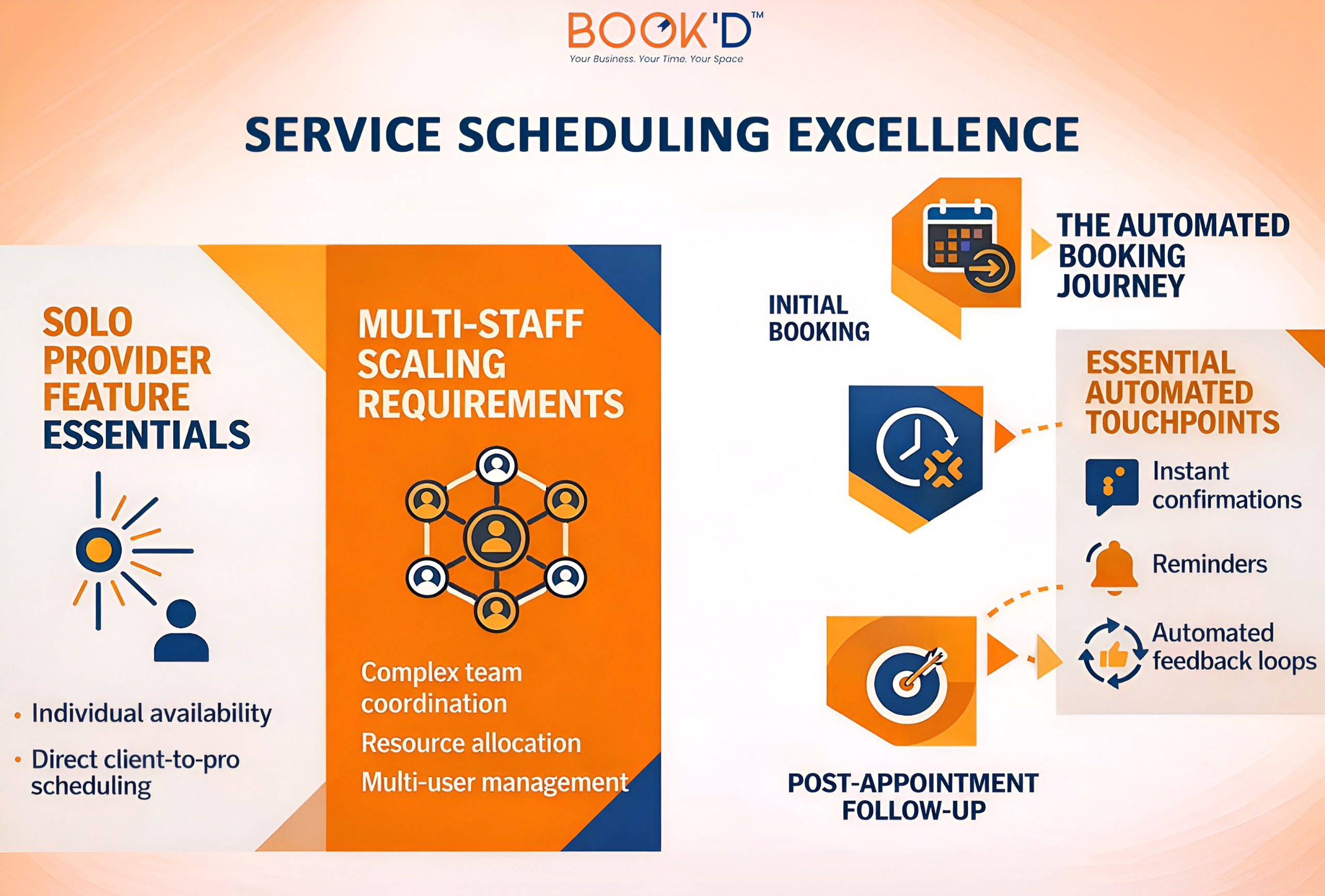
The productivity argument for scheduling automation isn’t abstract. It’s about removing entire categories of admin from your week entirely. Confirmations, reminders, deposit collection, policy enforcement, and calendar updates. All of it is running without your involvement.
What that creates isn’t just efficiency. It creates a different relationship with your schedule. Instead of constantly managing it, you trust the system to manage it. You show up, do the work, and leave. The gaps between appointments aren’t swallowed by follow-ups and inbox management.
For service businesses, especially, where every hour of the day has a direct dollar value attached to it, that shift is significant in ways that compound over time.
An Overview
Final Thoughts
Scheduling is one of those things that should run in the background without demanding constant attention. When it does, everything else in the business gets easier. That’s what Just-Booked is built to make possible for service businesses that are done managing it manually.
FAQs
What is the best appointment scheduling software for service businesses?
The best platform is the one that matches how your specific business actually operates. Solo providers need simplicity, strong reminders, and deposit collection. Multi-staff businesses need resource-level availability and staff management. The right answer starts with mapping your workflow before evaluating any platform, not after.
What features should service businesses prioritize in booking software?
Automated reminders, real-time calendar sync, deposit collection at booking, and cancellation policy enforcement deliver the most direct impact on revenue protection and time savings. A smooth client-facing mobile experience matters just as much because friction in the booking flow means fewer completed bookings, regardless of how good everything else is.
Can scheduling software handle multiple staff or bookable spaces?
Many platforms can, but the quality varies significantly. If you manage multiple providers or spaces, look specifically for resource-based availability tracking. Test your exact setup during a trial period before building your workflow around any platform. Account-level scheduling and resource-level scheduling are meaningfully different things in practice.
How does scheduling software reduce no-shows for service businesses?
Primarily through automated reminders sent at timed intervals before each appointment. Most no-shows happen because people forget, especially for bookings made weeks in advance. Pairing reminders with a deposit requirement at booking strengthens the effect significantly because there’s now a financial commitment attached to the slot.
Is free scheduling software good enough for a service business?
For very basic needs sometimes, but most service businesses outgrow free tiers quickly. The features that genuinely change operations, deposits, policy enforcement, and resource booking tend to sit behind paid plans. One prevented no-show per month typically covers the cost of most entry-level subscriptions, which makes the math fairly straightforward.