


Here’s something that doesn’t get said directly enough. There’s a version of running a service business that looks completely fine from the outside but is quietly consuming your week from the inside.
You’re answering booking requests through texts and DMs at hours that have nothing to do with your working day. You’re manually confirming appointments the morning of because nothing was ever set up to handle it. You’re keeping track of everything in a diary or a spreadsheet that only makes sense to you and requires constant attention to stay accurate.
You’re chasing no-shows because there was no reminder, no deposit, no system of any kind to make showing up feel like a commitment rather than a suggestion. It works. In a fashion. Until something slips and you realize it’s been slipping quietly for longer than you’d like to admit.
The appointment scheduling software vs manual scheduling debate feels like it should have an obvious winner, and yet businesses stick with manual systems way past the point where they make sense. The familiar feels safer than the unfamiliar. Switching feels like a project. Nothing has exploded yet.
But the manual booking problems that matter most aren’t dramatic. They don’t announce themselves. They accumulate slowly in the background, a double booking here, a no-show that could have been prevented there, a cancellation policy that never really stuck because enforcing it meant having an uncomfortable conversation, until the total cost of all those small failures becomes impossible to ignore.
This isn’t about saying software is better because it’s the modern thing to do. It’s better because of specific, concrete things it does that a manual system simply cannot do, regardless of how organized or disciplined the person running it happens to be.
What Manual Booking Is Really Costing You
The cost of a manual booking system doesn’t show up anywhere you’d normally look for it. There’s no invoice. No line item. It shows up in hours that disappear into admin that have nothing to do with the actual work you’re in business to do.
Try counting the individual touches that surround a single appointment. The initial message back. The back and forth to find a time that works. The confirmation. The reminder you sent was because you were anxious about a no-show. The rescheduling thread when something came up on their end.
Maybe a follow-up after. Two minutes here, three minutes there. Across twenty appointments in a week, that’s not a small number. And none of those minutes required anything from you except time and attention that could have gone somewhere more useful.
That’s before you get to the structural failures that manual systems produce, not occasionally but reliably over time.
Manual booking problems aren’t random. They’re the completely predictable outcomes of asking a human to be consistently reliable about tasks that don’t require human judgment. Double bookings happen when a calendar isn’t updated in real time, and two people book the same slot through different channels without either of them knowing.
No-shows happen more often when reminders depend on someone remembering to send them on the right day. Cancellation policies become flexible and eventually meaningless when enforcing them requires a personal conversation every single time. Deposits don’t get collected because there’s no moment in a manual process where they’re actually required.
This isn’t bad luck. This is how manual systems work.
The Specific Places Everything Falls Apart
The Calendar That Depends on You Being Perfect
A manual calendar is only as accurate as the last time you updated it. The moment booking requests are coming in through more than one channel, and for most service businesses, that means at minimum texts, social media, maybe a website form, possibly walk-ins, keeping a single accurate picture of your availability becomes a daily risk rather than a solved problem.
For anyone running a private salon suite or managing a space where multiple services might be happening at the same time, allowing two different people to book the same slot through two different channels isn’t a hypothetical scenario. It happens. And then you’re left managing a situation that should never have occurred in the first place, with a client who has every right to be frustrated.
Real-time availability sync is one of the most fundamental automated scheduling advantages. The moment a slot is booked, it disappears from every channel at the same time. There’s no version of the calendar that’s an hour behind.
No-Shows That a Text Would Have Prevented
Most no-shows come from people who booked three weeks ago with every intention of showing up, and then the appointment slowly drifted out of their awareness as life got busier. A manual reminder process depends on you catching it in time, remembering which clients need a nudge, and actually sitting down to send messages on the right day at the right moment. That’s a lot of human reliability required for something that software does automatically and perfectly every single time without you touching anything.
The difference in no-show rates between businesses using automated reminders and those managing it manually is real, consistent across industries, and well-documented. It’s probably the single most immediately impactful of all automated scheduling advantages, and it starts working from day one.
The Cancellation Policy Everyone Ignores
You have a cancellation policy. In theory. Whether it actually applies in any given situation depends on whether you noticed the late cancellation in time, whether you decided it was worth bringing up, and whether you felt like having that particular conversation with that particular client on that particular day.
When enforcement is situational, clients figure it out fast. The policy stops functioning as a policy and quietly becomes a suggestion that applies when it’s convenient.
Booking software enforces the window you set automatically. The client tries to cancel it, and the policy just handles itself. You weren’t involved. You didn’t have to decide anything. You didn’t have to say a word. It happened the way you said it would happen when you set it up and never thought about it again.
The Honest Side-by-Side
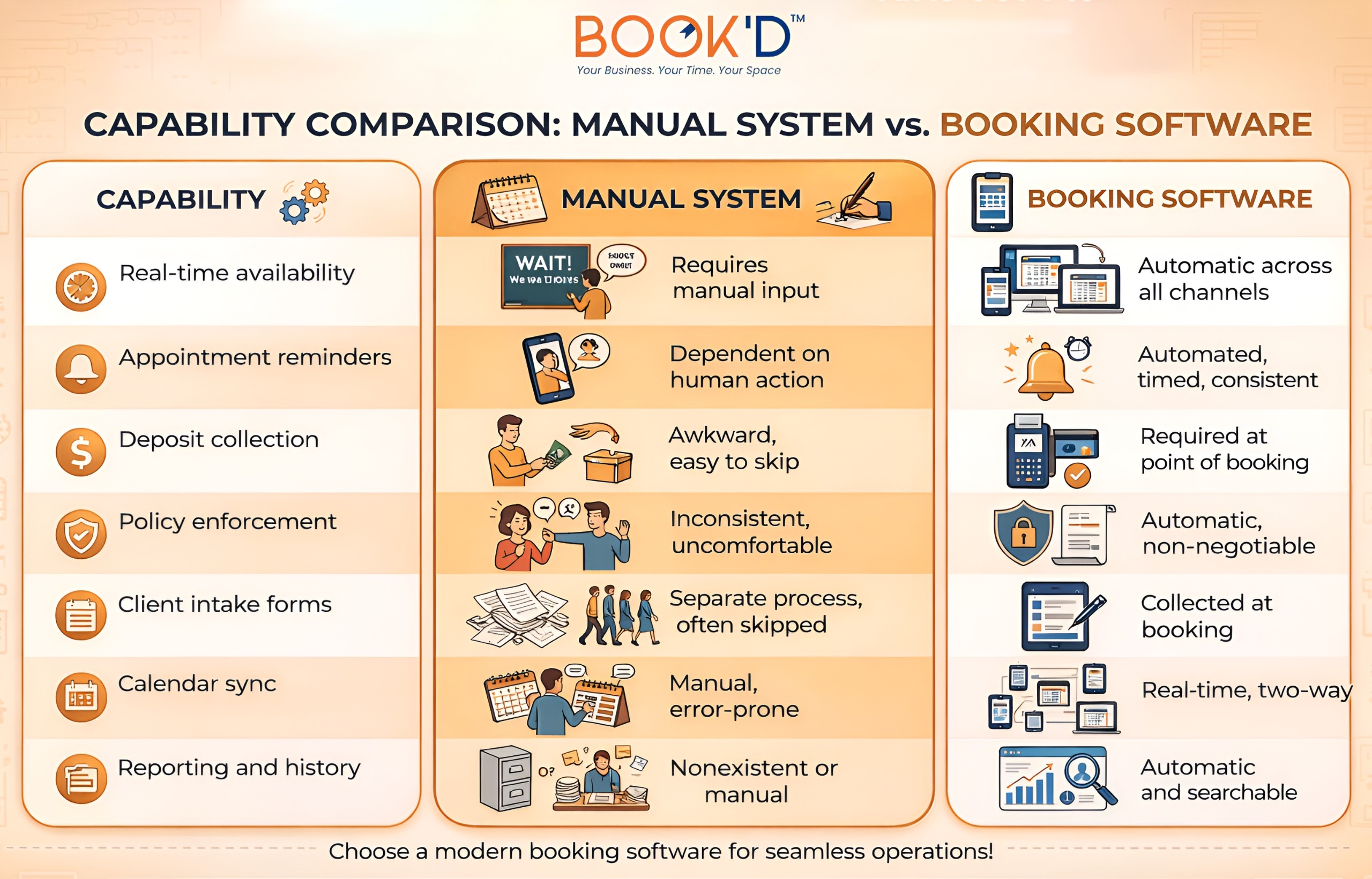 Every single row in that table is either a category of recurring admin work or a category of recurring business risk. Software handles the admin and removes most of the risk. The manual system leaves all of it sitting with you every single day.
The Switch Is Genuinely Less Painful Than You’re Imagining
This is the thing that keeps businesses trapped in manual systems for longer than makes any sense. The assumption that switching is going to be a whole project. Getting everything configured. Figuring out how to bring client data across. Learning a new interface while somehow still running the business. Sending some awkward messages to existing clients explaining that things are changing.
These concerns are real, and they are almost universally overstated by people who haven’t done it yet. Most modern booking platforms are designed to be up and running quickly. Client information transfers faster than people expect. And the message to existing clients tends to land well because a clean, simple booking link is easier for them, too, not just for you.
For anyone operating a salon booth rental or managing a shared workspace where multiple providers are coming and going, switching to booking software often marks a genuine turning point in how the whole operation feels day to day. Not just for scheduling. For payment collection, for client communication, and for the kind of daily predictability that makes it easier to actually show up to the work itself.
The first week after switching is typically when business owners realize how much of their week was disappearing into scheduling admin, and they’re never going to have to touch it again.
Manual scheduling works until it doesn’t. And by the time it visibly fails, it’s already been costing time and revenue in ways that built up so gradually nobody noticed how significant the total had become. That’s the exact problem Just-Booked is built to solve, for every business that’s finally ready to stop paying that cost. What to Actually Look For When You Make the Switch
Not all booking software is built for the same type of business, and picking something that doesn’t fit your setup creates its own set of problems. If you want to evaluate properly before committing to anything, this guide on key features of appointment scheduling software walks through exactly what to assess and what to ask before signing up.
The features that matter most are the ones that directly address the specific failures of manual systems. Automated reminders. Real-time calendar sync. Deposit collection at the point of booking. Policy enforcement that handles itself. A client-facing experience that works properly on a phone without friction.
For service businesses with more complex setups, whether that means multiple providers, multiple bookable spaces, or both, this blog on appointment scheduling software for service businesses covers what the landscape actually looks like and what fits different types of operations.
And if the time and productivity argument is what resonates most with your situation, this blog on appointment scheduling automation breaks down exactly where the saved hours come from and what they realistically add up to across a full working week.
FAQs
Is appointment scheduling software actually worth it for small businesses?
Yes, genuinely, and often more so than for larger operations. Small businesses and solo providers are carrying out every administrative task themselves, which means that removing manual booking work has a proportionally bigger impact on their available time. Even just automating confirmations and reminders frees up real hours every week that were going to tasks requiring no judgment or skill from the person doing them.
What are the biggest problems with manual booking systems?
The most significant manual booking problems are double bookings from unsynchronised calendars, higher no-show rates from inconsistent or forgotten reminders, cancellation policies that don’t get enforced reliably, missed deposit collection, and the steady time cost of touching every booking manually from start to finish. None of these is catastrophic individually. Together, they represent a consistent drain that compounds quietly and keeps adding up.
How does automated scheduling actually reduce no-shows?
Through timed reminders sent automatically at set intervals before each appointment. Most no-shows happen because people forget, especially for bookings made weeks out. A reminder the day before and another a few hours out keeps the appointment present in someone’s mind without any action required from the business. Adding a deposit requirement at booking strengthens this even further because there’s now a financial commitment attached to the slot that raises the stakes of simply not showing up.
What should I look for when switching from manual to automated scheduling?
Real-time calendar sync, automated SMS and email reminders, deposit collection at booking, automatic cancellation policy enforcement, and a clean, mobile-friendly client booking experience are the features that address the most common and most costly failures of manual systems. How well any platform handles your specific setup should be tested during a trial period before you build your workflow around it.
How disruptive is switching from manual to booking software?
Less disruptive than almost everyone imagines before they do it. Initial setup for most service businesses takes a few hours. Bringing existing client information across is usually simpler than anticipated. The communication to existing clients is typically a short message with a new booking link, and most clients respond positively because the process is easier for them, too. The disruption is almost always smaller than expected, and the improvement tends to show up within the first week.