

There’s a specific kind of frustration that hits when you’re standing in your studio, fully prepped, and your 2 PM just… doesn’t show. No text. No call. Nothing. You wait a few minutes, check your phone, and eventually accept that the next hour is gone. So is the income you were counting on.
If you run any kind of service-based business, you know this feeling. And if it’s happening more than once or twice a month, it’s not bad luck. It’s a gap in your follow-up process.
The fix isn’t complicated. Appointment reminder systems have become one of the most quietly powerful tools for independent service providers, not because they’re flashy, but because they work. They catch the clients who genuinely forgot. They give the ones with conflicts a chance to reschedule. And they do all of it without you having to remember to follow up manually every single time.
This post breaks down how these systems actually function, why they’re worth the investment, and what to look for when choosing one for your business.
Why No-Shows Happen
Before you write off every no-show client as inconsiderate, it’s worth stepping back. The most common reason people miss appointments isn’t that they don’t care. It’s what they forgot.
Think about your own life. You book something a week out, life picks up speed, and by the time that day rolls around, it’s genuinely slipped your mind. That’s not negligence. That’s just how memory works, especially for people juggling full schedules.
Which means the reminder isn’t just a courtesy. It’s a functional part of the booking process. Skipping it is like setting a dinner reservation and assuming your guests will remember without a single prompt.
Automated appointment reminders exist to close that gap. They don’t replace the human relationship you’ve built with your clients. They just make sure the appointment you both agreed to actually happens.
What a Real Reminder System Looks Like in Practice
A lot of people hear “reminder system” and picture a single automated text the night before. That’s part of it, but a well-built system does quite a bit more. The most effective approach uses a sequence, not a single message.
Here’s a general framework that works well for most service businesses:
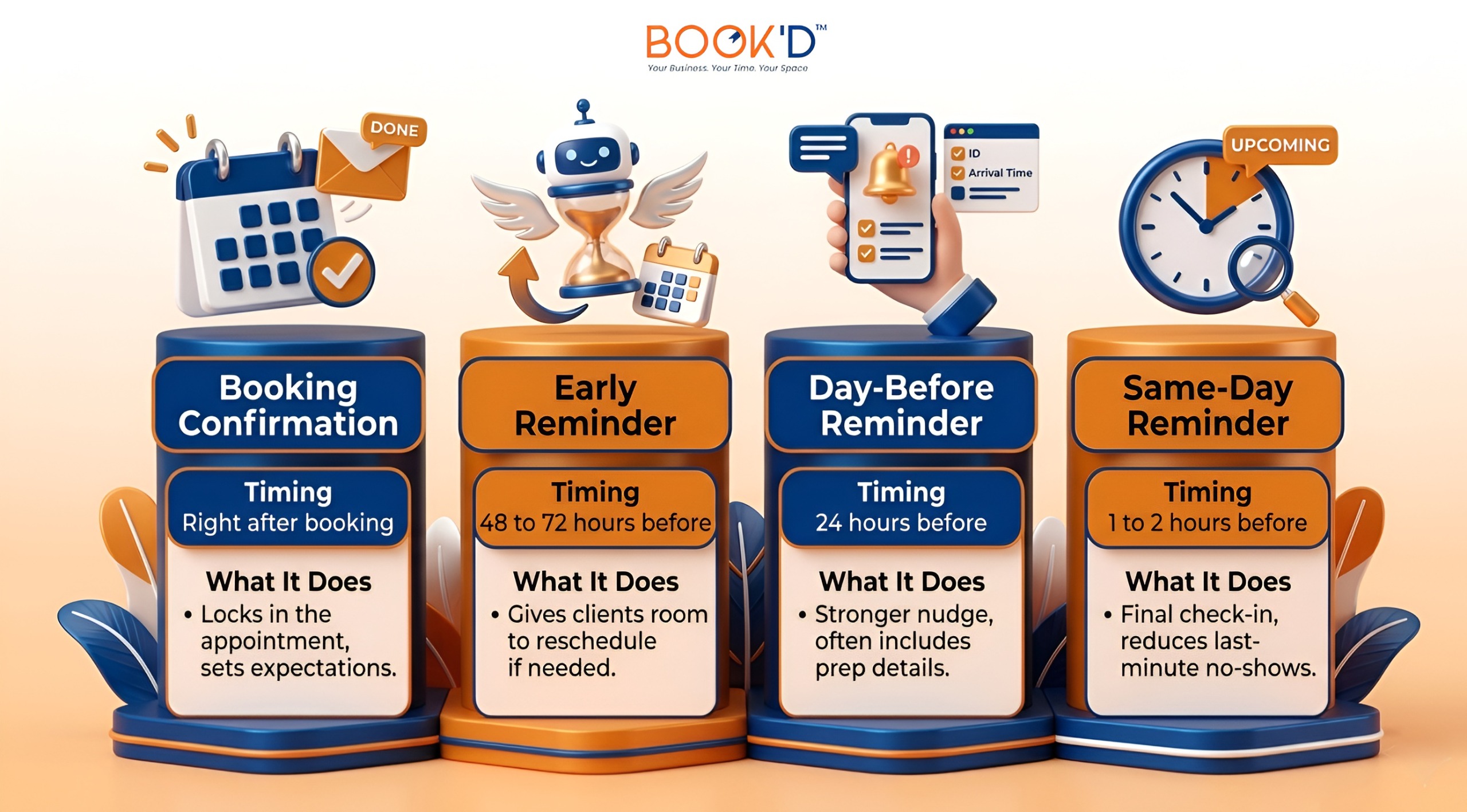
Each message serves a different purpose. The early ones are about giving clients time to act. The latter ones are about making sure the appointment stays top of mind. Together, they create a rhythm that feels attentive rather than aggressive.
The Real Cost of an Empty Slot
Numbers matter here. If you’re renting salon suites for rent or working out of a private suite, every empty hour has a dollar amount attached to it. A missed lash appointment might be $120. A missed haircut might be $75. A missed brow session, a facial, a colour treatment. It adds up fast.
Three no-shows a week at an average of $100 per session is $300 gone. Over a year, that’s more than $15,000 in lost revenue. Not from bad service. Not from poor marketing. Just from clients who would have shown up if someone had sent them a reminder.
Appointment reminder automation protects that income without adding to your workload. Once the workflow is set up, it runs on its own. You’re not texting clients at 8 PM the night before their appointment. You’re not wondering whether you followed up with the person who booked two weeks ago. The system handles it consistently, every time.
That consistency is actually the most underrated part. It’s not just about preventing individual no-shows. It’s about building a booking experience that feels reliable and professional, which keeps clients coming back.
Picking the Right Reminder Software for Bookings
This is where people sometimes get tripped up. There are a lot of tools on the market, and not all of them are worth your time. Here’s what actually matters when you’re evaluating your options.
It Should Work Across Channels
Not every client checks email. Not every client responds to texts. The reminder software for bookings that tends to work best gives you flexibility, SMS, email, and sometimes app notifications, so you can reach people where they actually pay attention.
Personalisation Makes a Difference
A generic “reminder: you have an appointment tomorrow” is easy to scroll past. A message that uses the client’s name, mentions the specific service they booked, and maybe includes something relevant like where to park or what to bring feels different. It feels like it came from a real business that pays attention. That’s the impression you want to leave.
Make Rescheduling Easy
This one’s counterintuitive but important. When clients can reschedule directly from the reminder with one tap, they’re more likely to actually do it instead of just not showing up. An early reschedule is infinitely better than a no-show because you still have time to fill that slot.
Reinforce Your Policies Without the Awkwardness
Reminders are also a natural place to mention your cancellation window. It doesn’t need to be heavy-handed. Something like “please let us know at least 24 hours in advance if you need to cancel” tucked into a friendly message does the job. It sets expectations clearly before anyone has to have an uncomfortable conversation.
Who Benefits Most From These Systems
The honest answer is almost anyone running a service-based business. But independent operators feel the impact most directly.
If you’re working out of a barber chair for rent or managing your own esthetician room, you don’t have a front desk. You don’t have someone whose job it is to call clients the day before. You’re the service provider and the admin and the marketer, all at once. Appointment reminder automation fills that front desk gap without adding to your plate. It runs in the background while you focus on the actual work, the clients in front of you, the craft you’ve built your business around.
What the Research Actually Shows
Businesses that switch to structured reminder systems consistently see meaningful drops in no-show rates. Depending on the industry and the reminder frequency, reductions of 30% to 80% are well documented. That’s not a rounding error. That’s a fundamental shift in how reliably your schedule holds.
Text reminders tend to perform best for service businesses simply because of open rates. SMS messages get opened at around 90%, compared to roughly 20 to 30% for email. That doesn’t mean email is useless. For detailed booking confirmations and preappointment instructions, it’s great. But when you need someone to actually see a message quickly, a text wins most of the time. The right approach usually combines both, using each channel for what it does best.
Closing Thoughts
No-shows aren’t a client problem. There’s a communication problem. And once you see them that way, the solution becomes pretty clear. A good appointment reminder system doesn’t just send texts. It creates a consistent, professional follow-up experience that makes clients more likely to show up, more likely to reschedule when they can’t, and more likely to trust your business enough to book again.
FAQs
- How do appointment reminder systems reduce no-shows?
They work by sending clients timely, automated messages before their appointment rather than relying on a single confirmation. Most no-shows happen because people forget, not because they don’t want to come. A well-timed sequence of reminders keeps the appointment on their radar and gives them a clear path to reschedule if something comes up.
- How many reminders should I send for an appointment before?
Most service businesses get the best results from two to three reminders. One sent 48 to 72 hours before gives clients time to adjust their schedule. A second the day before serves as a stronger nudge. An optional same-day message, sent an hour or two out, tends to catch any last-minute forgetfulness. Beyond three, reminders can start to feel excessive.
- Are text reminders better than email for service businesses?
For time-sensitive reminders, yes. Text messages have significantly higher open rates and get read much faster than emails. That said, email remains useful for initial confirmations and more detailed communication. Using both strategically, rather than choosing one over the other, usually delivers the strongest results.
- Will automated reminders feel impersonal to my clients?
Not if they’re set up thoughtfully. The best reminder systems let you personalise messages with the client’s name, service details, and your brand’s tone. A well-written automated message can feel just as warm as one you sent manually, without you having to write it every single time.
- Can reminder software also help manage cancellations?
Yes, and this is one of its more underappreciated benefits. When reminders include an easy way for clients to reschedule or cancel in advance, you get earlier notice and more time to fill that slot. It turns a potential no-show into a manageable schedule change instead of a lost appointment.