


Here’s something nobody tells you before you go freelance.
The work itself? You can handle that. You’ve built the skills, done the reps, figured out your niche. That part makes sense. What catches most freelancers off guard is everything that surrounds the work. The admin, the follow-ups, the endless scheduling coordination that somehow expands to fill whatever time you give it.
“Does Monday work?” “Actually, can we push it to Wednesday?” “Wait, what time zone are you in?” “I thought the call was at 2.” Sound familiar? That loop runs quietly in the background of almost every freelance practice, and most people just accept it as part of the deal.
It doesn’t have to be.
Booking software for freelancers isn’t a luxury tool for people with overflowing calendars. It’s the infrastructure that lets you stop being your own scheduling assistant. You set your availability once. Clients book themselves in. Confirmations go out automatically. Reminders land without you touching anything. You find out about the appointment when it shows up in your calendar, not after three emails.
This blog walks through exactly how that works in practice, what features actually matter, and how to set things up without turning it into a project.
The Scheduling Problem Nobody Talks About
Most freelancers don’t realize how much time they’re losing to scheduling until they actually start tracking it.
Think about one client engagement. There’s the initial “let’s find a time” exchange, usually two to four emails. Then, the confirmation you send manually. The reminder you write the day before because you’re worried they’ll forget. The reschedule request comes in the morning. The follow-up to lock in a new time. For one appointment, you might spend 20 to 30 minutes on pure logistics. Now multiply that across a week.
For a freelancer billing at $75 an hour, that’s real money disappearing into your inbox every single week. And it compounds. The more clients you take on, the more time gets eaten by coordination before you ever do the actual work.
Freelancer scheduling software exists to close that gap. Not to make you less accessible or more robotic in how you deal with clients, but to handle the part of the process that was never personal to begin with. Nobody needs a human to type “confirmed for Tuesday at 3 pm.” That part can run on its own.
What Freelancers Actually Need From a Booking System
Here’s where it’s worth being specific, because not every booking tool is built for how freelancers actually work. A lot of platforms are designed for businesses with reception staff, fixed locations, or teams managing the calendar.
The feature sets reflect that. What independent freelancers need is different. Simpler in some ways, more flexible in others.
Self-Booking Without the Back-and-Forth
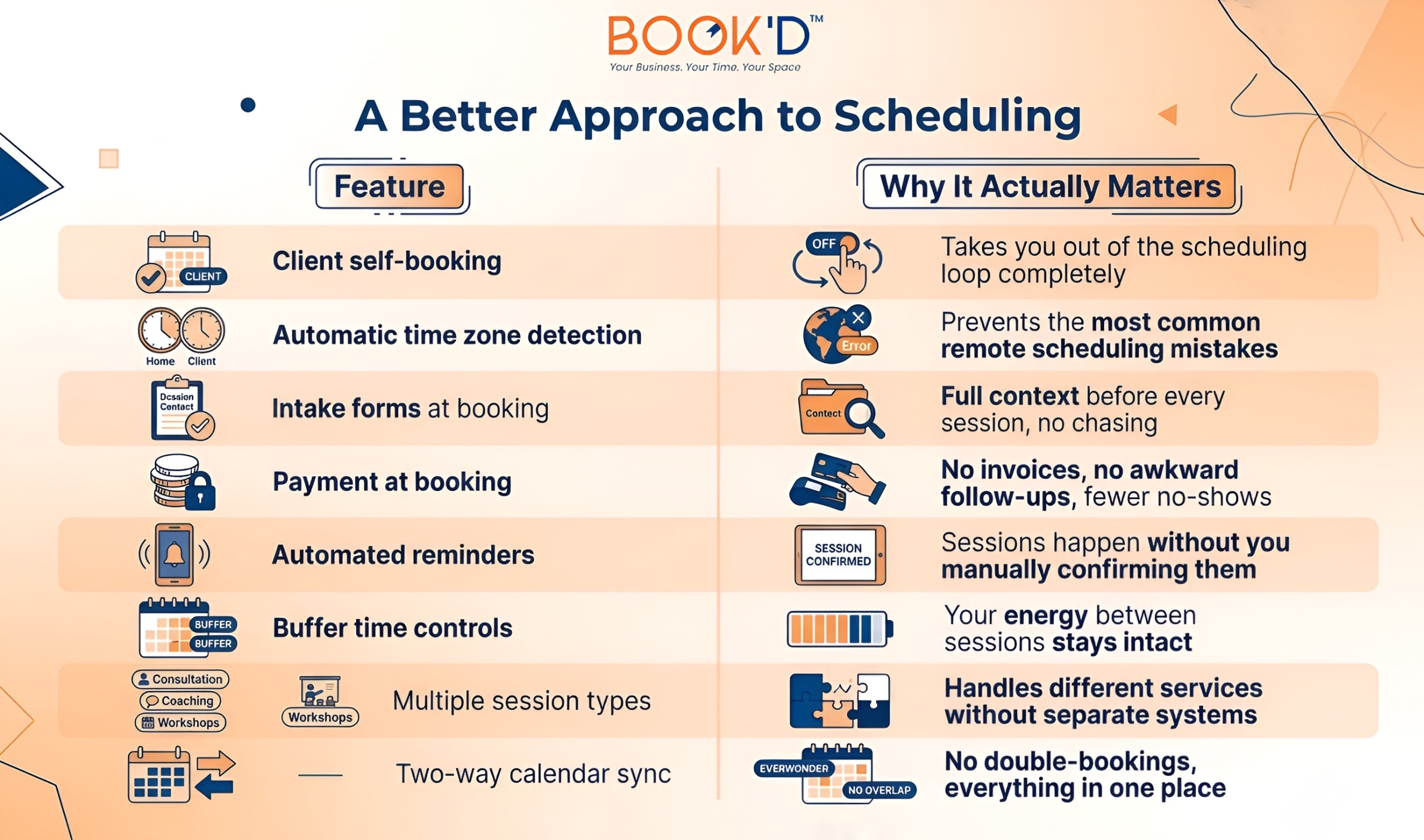
The core of any good booking system for freelancers is letting clients book without pulling you into the process. You define when you’re available and for what. Clients open your booking link, see what’s open, pick a time, and get an instant confirmation. The whole exchange takes them two minutes and takes you zero.
That shift alone, moving from reactive scheduling to a self-serve system, recovers more time than almost any other operational change a freelancer can make.
Time Zones That Just Work
If your clients are in different cities or countries, and most freelancers have at least a few, your booking link needs to show your availability in their local time automatically. Not with a disclaimer at the bottom. Not with a manual calculation step. Just automatically, in the background, every time.
The number of missed or delayed sessions that trace back to a simple time zone miscommunication is genuinely staggering. This feature eliminates that category of problem entirely.
Intake Forms That Travel With the Appointment
Before a project kickoff call, a strategy session, or even a routine check-in, knowing the client’s context in advance changes how useful you can be. Appointment booking for freelancers works best when the intake questions arrive alongside the booking notification, not in a separate email chain you have to dig through to find.
Good booking platforms let you attach a short form directly to the booking flow. The client fills it out when they book. You receive both together. You walk into every session already knowing what’s on the table.
Payment Before the Session, Not After
This one gets underused, and it really shouldn’t. Collecting payment at the time of booking does two things that matter a lot. First, it confirms the client is genuinely committed rather than tentatively penciling something in. Second, it removes the invoice follow-up from your workflow completely.
If you’ve ever had to send a polite “just checking in on that invoice” message to a client you actually like, you know the specific kind of energy that costs. Payment at booking just makes that moment disappear.
Reminders That Go Out Without You
A 24-hour reminder and a one-hour reminder are sent automatically. That’s all it takes to cut noshows dramatically. You configure it once, and it runs forever in the background. No drafting reminder emails, no wondering whether you should nudge someone, no last-minute “just wanted to confirm” texts.
Freelancers Across Industries Are Using This Differently
The use case looks different depending on what you do, but the underlying logic holds everywhere.
A freelance photographer uses a booking system to schedule consultations, shoots, and gallery review sessions as separate bookable appointment types. Each one has its own length, its own intake questions, and its own payment requirement. The whole client journey runs through one link.
A freelance writer sets up a system for editorial calls, project briefings, and manuscript review sessions. Clients can book whichever type they need without emailing to ask what’s available.
An independent voiceover artist or audio producer working out of a rent podcast studio space uses a booking link to manage client session time, collect payment upfront, and send technical prep details automatically in the confirmation. Professional from the very first touchpoint.
The details differ. The time saved is remarkably consistent.
The Bigger Picture: Why This Matters Beyond Just Scheduling
It’s easy to frame this as a productivity conversation. Save time, reduce friction, streamline the calendar. That’s all real. But there’s a layer underneath it that doesn’t get talked about enough.
The way clients experience booking with you says something about how you run your practice. A clean, branded booking page that loads in two seconds and confirms instantly reads as professional before a single word is exchanged. A chaotic inbox thread to nail down a meeting time reads differently, even if the work you do is exceptional.
This is something that comes up across service industries in very similar ways. If you’ve read through booking software helping salon businesses, the parallel is actually pretty striking. The client experience before the appointment shapes expectations for the appointment itself.
Freelancers who invest in that layer tend to attract and retain higher-caliber clients because the professionalism is visible from the first interaction.
Same pattern in fitness and wellness. The reason fitness studios need purpose-built booking software isn’t just operational efficiency. It’s about presenting a consistent, professional experience that builds trust. Freelancers benefit from exactly the same dynamic.
And for those scaling into consulting or advisory work, the guide on best booking software for consultants goes deeper on the features that matter most once your practice starts operating at a higher level.
Getting Set Up Without Making It a Whole Thing
The honest advice here is to start smaller than you think you need to. Add your session types. Set your weekly availability. Connect your calendar. Enable payment collection. Turn on automated reminders. That’s your setup. Go live with that, send your booking link to the next client who asks about scheduling, and see how it goes.
Most freelancers who do this are surprised by how quickly it becomes the default. Clients adapt fast. The back-and-forth emails drop off almost immediately. The time savings are noticeable within the first week.
From there, add intake forms when you want more context before sessions. Set buffer time between appointments when you realize back-to-back calls are draining. Create multiple session types as your service menu grows. Build the system around what you actually experience rather than trying to anticipate every edge case upfront.
Some freelancers work from shared spaces, and the same logic applies to how they manage physical availability. Someone using a studio space for rent for client-facing work benefits from the same clarity and automation in their booking system as someone working fully remotely.
The goal is the same: clients know exactly when and how to book, and you spend exactly zero manual effort making that happen.
What Good Booking Software Should Cover
 FAQs
FAQs
- What is the best booking software for freelancers?
The best booking software for freelancers handles self-booking, automatic time zone detection, payment collection, and reminders without requiring constant input from you. JustBooked is built specifically for independent professionals who need clean, reliable scheduling without the overhead of a full business platform.
- How does freelancer scheduling software actually reduce no-shows?
It works through two mechanisms that reinforce each other. Automated reminders sent before the session keep the appointment visible for clients. Upfront payment collection at the time of booking creates a genuine financial commitment. Together, they make it far less likely that someone skips without notice.
- Can a booking system for freelancers handle more than one type of service?
Yes, and this is one of the more useful features for freelancers with varied offerings. You can set up different session types with distinct durations, pricing, intake forms, and availability windows. A client who needs a quick advisory call books something different from a client who needs a full project kickoff, and both live in the same system.
- Is appointment booking for freelancers worth paying for?
For most freelancers charging professional rates, the time recovered from scheduling admin alone tends to cover the cost within the first month. Reduced no-shows and a more polished client experience add to that fairly quickly. The question is less whether it’s worth it and more how long you want to keep managing it manually.
- Will clients actually use a self-booking system, or will they still just email?
Most clients adapt quickly and actually prefer it once they use it. Picking a time from a live availability calendar is faster and easier than the email exchange it replaces. The clients who still email to schedule are usually the ones who haven’t been introduced to the booking link yet. Once they use it, they tend to use it every time.