


Nobody starts a consulting practice because they love managing calendars.
You get into it because you’re good at something. Strategy, coaching, operations, finance, whatever your lane is. The work itself is the point. But somewhere between landing your first few clients and actually building a sustainable practice, the scheduling piece quietly becomes its own part-time job.
The back-and-forth alone is exhausting. “Does Tuesday work?” “Actually, can we do Thursday?” “What time zone are you in?” “I thought it was 2 pm.” You know the drill. And by the time you’ve confirmed three sessions for the week, you’ve spent an hour on logistics that should have taken five minutes.
That’s the gap that good booking software for consultants is supposed to close. Not by overcomplicating your workflow with a tool that needs a tutorial to operate, but by handling the routine stuff so reliably that you stop thinking about it altogether. The calendar just works. Clients show up. Payments land. You focus on the actual work.
When “Good Enough” Stops Being Good Enough
Most consultants patch together something that works early on. A free Calendly link, a shared Google Calendar, maybe just a “text me, and we’ll figure it out” approach. When you have two or three clients, that’s fine. Honestly, it’s probably fine for five.
But then something shifts. Your client load grows. Referrals start coming in from people in different cities, different time zones. You’re running discovery calls alongside ongoing retainer sessions. You launch a group program. And the patchwork system you built starts showing its cracks.
A doublebooking you almost missed. A client who didn’t get a reminder and no-showed for a $300 session. An intake conversation you have to repeat every single time because you never built a form for it. None of these is catastrophic on its own. But they chip away at the experience you’re trying to create, and they quietly chip away at your revenue, too.
Consultant scheduling software exists specifically for this inflection point. It’s the infrastructure upgrade that lets your practice actually run like a business instead of a freelance hustle you’re holding together with duct tape.
The Features That Actually Matter (And the Ones That Don’t)
There’s no shortage of booking tools out there. The trick is knowing which features actually serve consultants and coaches specifically, and which ones are mostly noise.
Time Zone Handling That You Never Have to Think About
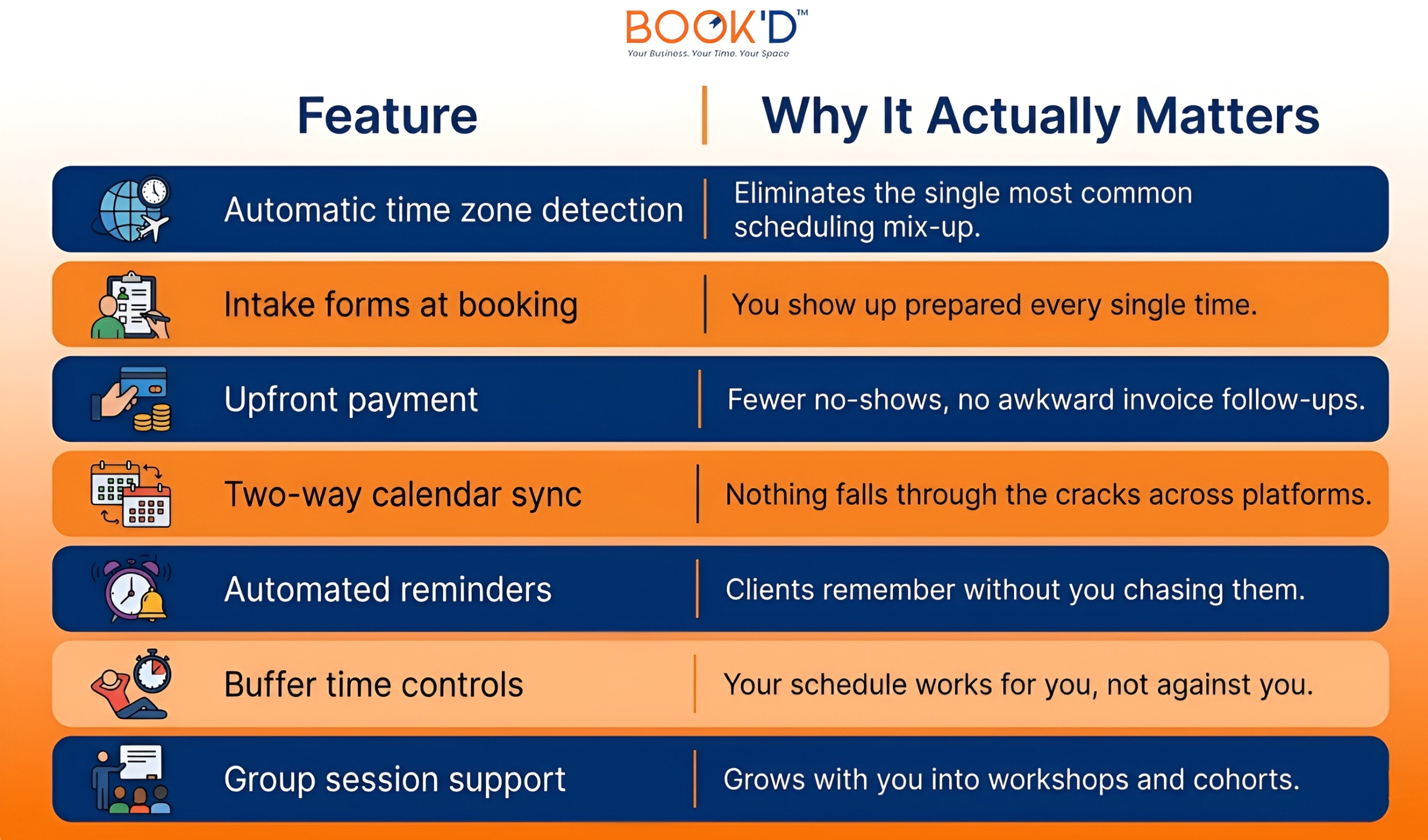
If any of your clients are in a different time zone than you, this is the one feature that will save you the most grief. Your booking link should automatically show your availability in whatever time zone your client is sitting in. They shouldn’t have to do math. You shouldn’t have to add disclaimers. It should just work.
Intake Forms That Travel With the Booking
One of the most underrated things a booking system for coaching businesses can do is attach intake questions directly to the booking flow. The client picks their time, fills out a short form, and you receive both together. You walk into every session knowing the context. No precall emails, no “remind me what you’re working on,” no wasted first fifteen minutes.
Payment Before the Session, Not After
Collecting payment at the time of booking does two things. It confirms that the client is genuinely committed, and it removes the invoice follow-up from your plate entirely. If you’ve ever sent a polite reminder about an unpaid invoice to a client you really liked, you know how much that moment costs in terms of relationship energy. Just remove it from the equation.
Buffer Time So Your Day Has Breathing Room
Blocking ten or fifteen minutes between sessions sounds simple. But when you’re busy, it’s the first thing that disappears if your booking tool doesn’t enforce it automatically. Smart scheduling means your calendar respects your energy, not just your availability.
Side-by-Side: What Separates a Good Booking Tool From a Great One
 Consultants and Other Service Pros Have More in Common Than You’d Think
Here’s something worth knowing. The scheduling challenges consultants deal with aren’t unique to consulting. This blog touches on it, but it’s genuinely useful to understand how booking software helps salon businesses, because the parallels are surprisingly close. High appointment volume, repeat clients, time-sensitive slots, package-based billing, the mechanics of filling and managing a calendar are almost identical across service industries, even when the actual work looks nothing alike.
The same goes for fitness and wellness. The reason fitness studios need booking software purpose-built for their pace is the same reason a coach with a full client roster needs more than a shared calendar link. When your revenue is tied directly to time slots, the tool managing those slots stops being optional infrastructure. It becomes part of how your business actually functions.
Check out our blog on Fitness Studios Needing Booking Software.
The consultants who figure this out early tend to grow faster. Not because the software is magic, but because they stop bleeding time and money on scheduling logistics and redirect that energy toward work that actually moves the needle.
What the Old System Is Actually Costing You
Let’s make this concrete. Say you bill at $200 an hour and spend roughly 45 minutes a week on scheduling admin. That’s time you’re not billing, not resting, and not doing anything productive. Across a year, that’s close to $7,500 in opportunity cost from calendar management alone.
Now factor in no-shows. One missed session per week at that rate is more than $10,000 a year walking out the door. A booking system with upfront payment and automated reminders doesn’t eliminate no-shows entirely, but it cuts them dramatically. Most consultants who make the switch notice the difference within the first month.
There’s also a less obvious cost worth mentioning. Some consultants and coaches work out of shared professional spaces, things like salon booth rental setups or coworking studios, where the physical space and the client calendar need to run in sync. When those systems don’t talk to each other, the gaps get filled manually. And manual gap-filling is just another name for unpaid administrative work.
The right appointment booking for consultants removes that friction. Not all of it at once, but consistently, day over day.
How to Actually Choose Without Overthinking It
The honest answer is that most solid booking platforms will cover your basic needs. What you’re really evaluating is fit. Does it match how you actually work, or does it require you to adapt to it?
Start by walking through your own booking flow as if you were a client. Open an incognito browser, pull up your booking link, and try to schedule something. How many steps does it take? Is the confirmation email clear? Does the reminder show up when it should? If anything feels clunky from the outside, your clients are already experiencing that.
From there, make sure it syncs with whatever calendar you actually live in. If that’s Google Calendar, it needs to sync cleanly. If you use Outlook, the same thing. Broken sync means broken trust in the system, and the moment you stop trusting your booking tool, you’re back to managing everything manually.
Keep it simple at first. Scheduling, reminders, and payment will handle the bulk of your needs. Once your volume grows or you start running group programs, you’ll know which additional features actually matter for your specific practice.
FAQs
- What is the best booking software for consultants?
The best booking software for consultants handles the full flow without requiring constant input from you. That means automatic time zone detection, intake forms, upfront payment, and reliable reminders. JustBooked is built specifically for service professionals who book time as their core product.
- How does consultant scheduling software actually reduce no-shows?
Two mechanisms work together here. Automated reminders keep the appointment visible for clients leading up to the session. Collecting payment at the time of booking creates a financial commitment that makes cancelling without notice far less likely. Together, they make a real dent.
- Can a booking system for coaching businesses handle group programs?
Yes, and it’s one of the more useful features for coaches who want to scale. Good platforms let you set session capacity, manage waitlists, and run cohort enrollments alongside individual appointments. The setup usually doesn’t require any technical knowledge.
- Is premium booking software worth it for solo consultants?
For most consultants charging professional rates, the time savings alone tend to cover the cost within the first few weeks. Reduced no-shows and a more polished client experience add to that fairly quickly. It’s less a question of cost and more a question of when to make the switch.
- What features matter most for appointment booking for consultants?
Time zone handling and intake forms are the two most underrated. Payment collection and calendar sync are close behind. Buffer time controls and availability limits become increasingly important as your session volume grows or your practice starts moving into group work.