


Here’s the thing about running a salon that nobody tells you before you open one. The actual work, the part you trained for, the cuts, the color, the treatments, the client who’s been coming to you for six years and trusts you completely, that part is genuinely great. It’s everything around it that slowly starts to eat your day.
Booking requests are coming in through three different channels while you’re disappointed. Clients texting to reschedule at nine in the evening. A no-show on a Wednesday morning that just cost you an hour you can’t get back, and you had no warning about it. A double booking that happened because the calendar wasn’t updated fast enough. None of this is the job. But all of it takes up time like it is, and the cumulative weight of it is real.
Booking software for salons is specifically built to remove that weight. Not in a vague, general sense. In a very specific sense, here are the exact tasks you will never have to handle manually again. And for a business where every chair, every hour, and every client relationship has a direct dollar value attached to it, that kind of specificity is exactly what matters.
What Managing Bookings Manually Is Actually Costing You
Most salon owners don’t track what manual booking costs because the cost doesn’t arrive as a bill. It shows up as hours that disappear and as revenue that never materializes because there was no system in place to protect it.
Count the touches surrounding a single appointment. The initial message back. The back and forth to land on time. The confirmation. The reminder you sent manually was because you were nervous about a no-show. The rescheduling thread was used when something came up on their end. Two minutes here, three minutes there.
Across twenty or thirty appointments a week, that’s a significant chunk of time going to coordination that has nothing to do with the work you’re actually there to do.
The no-show problem deserves its own honest mention because it’s the one that hurts most visibly and most immediately. A client who doesn’t show up for a color appointment isn’t just an empty slot. It’s time that couldn’t be offered to someone else, a product that may have been prepared, and revenue that simply didn’t arrive. Manual reminder systems depend on someone remembering to send them on the right day at the right time with enough consistency to actually make a difference. Software does it automatically every single time without anyone thinking about it.
What Changes When You Have the Right System
Start With the Client Booking Experience
The instinct when evaluating any salon appointment scheduling software is to focus on the admin side first.
What does the dashboard look like? How does reporting work? How do you edit a service or block off time? All of that matters, but it comes second to a more important question. What does it actually feel like to be a client booking with you?
A booking flow that’s slow, asks for more information than necessary, doesn’t load properly on a phone, or requires account creation before anything else loses people before they finish. They don’t complain. They don’t message to explain. They just don’t complete the booking and find a salon that makes it easier. That attrition is invisible and consistent.
Good beauty salon booking tools make the whole experience feel effortless on the client side. A clean page, mobile-optimized, a few steps, immediate confirmation. That experience sets the tone for the entire client relationship before anyone has physically walked through the door.
Automated Reminders and What They Actually Do to No-Show Rates
This is the feature with the most immediately visible impact, and the math behind it is genuinely simple. A reminder sent the day before and another a few hours out keeps the appointment in a client’s mind without any effort from you. Most no-shows happen because people forget, especially for bookings made two or three weeks in advance. The reminder is the difference between someone who shows up and someone who didn’t mean to miss it but did anyway.
For anyone renting space independently, managing a salon suite for rent arrangement, or running a booth on their own, every empty slot carries a real cost. Automated reminders aren’t a nice-to-have feature in that context. They’re how you protect revenue that would otherwise just disappear without explanation.
Deposits That Stick Without an Awkward Conversation
There’s a real and consistent behavioral difference between a client who has paid something to hold a slot and one who hasn’t. The one who paid shows up. Collecting deposits manually is awkward, easy to let slide under pressure, and dependent on your remembering to ask. A booking system collects it automatically at the point of booking. No conversation needed. No exception was made because the moment felt uncomfortable.
Calendar Sync That Actually Works in Real Time
Your booking system and your actual calendar need to be talking to each other constantly. When they’re not, you end up managing two different versions of your schedule, and eventually they disagree at exactly the wrong moment.
A client books a slot you’d mentally reserved for something else. You block off time on your end without it updating your availability. Real-time two-way sync makes this a non-issue rather than an ongoing risk.
How Different Salon Setups Use Booking Software
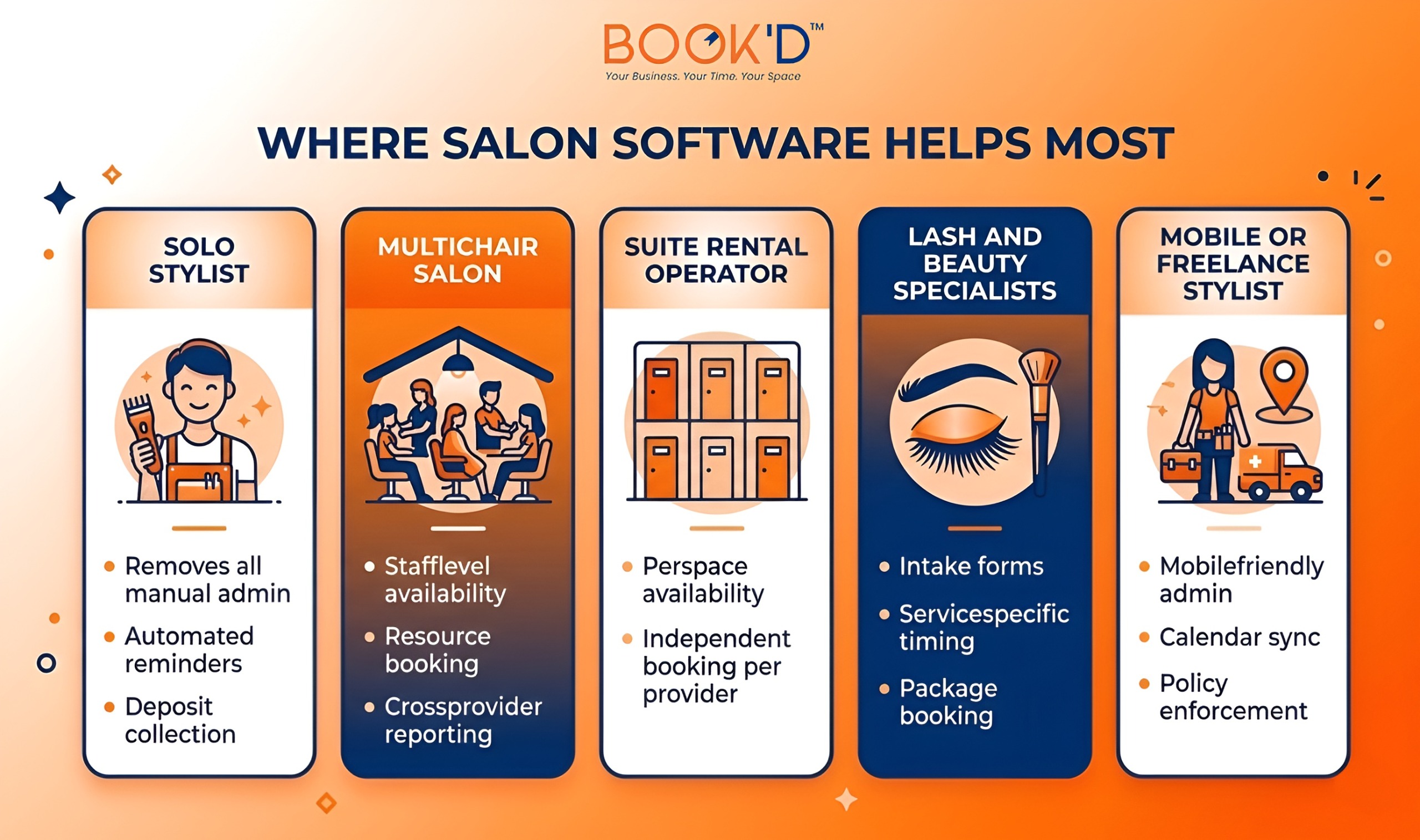
The platform that works for a fifteen-chair salon with a receptionist is almost certainly not the right fit for someone managing a barber chair-for-rent situation independently. Understanding what your specific setup actually requires before evaluating anything saves a significant amount of time and prevents the frustration of switching platforms six months after committing to the wrong one. The Features That Make the Biggest Difference
Cancellation Policies That Enforce Themselves
A cancellation policy that only applies when you notice and decide to bring it up isn’t really a policy. It’s a guideline that clients figure out pretty quickly, but it doesn’t always apply. Booking software enforces the window you set automatically. A client tries to cancel inside it, and the system handles the consequence without you initiating anything. The first time this happens on its own, without you having to say a word, you’ll understand immediately why this feature matters so much in practice.
Client History That Makes Every Visit Feel Personal
There is a real difference between a return visit where you already know what someone had last time, what they mentioned, what you noted, and one where you’re starting from scratch every single time. Most solid salon booking systems surface this automatically when a booking comes in. No extra effort from you. It just changes the quality of every interaction with a returning client, and they feel it even when they can’t articulate why.
Intake Forms That Arrive Before the Client Does
Collecting information at the point of booking means the consultation has already started before anyone sits in your chair. For services involving color, chemical treatments, or skincare, knowing what you need to know in advance reduces surprises and saves meaningful time across a full week. It also signals to new clients that you run a professional, prepared operation, which sets the right expectation before the appointment even begins.
A Booking Page That Actually Looks Like Your Business
Your booking page is frequently the first real interaction a new client has with your brand. A generic template with default styling and placeholder descriptions doesn’t build confidence or reflect the standard you hold in the actual salon.
Your logo, your colors, your service descriptions written the way you’d genuinely describe them to a client in person. That impression lands before anyone has visited, and it influences whether they complete the booking or decide to look elsewhere.
Before You Commit to Any Platform
Not all salon booking systems are designed for the same type of business. The features that matter most depend on whether you’re solo or managing multiple providers, whether you have a physical space or work across locations, and how much complexity your day-to-day actually requires.
The single most useful thing you can do before committing to anything is go through the booking process yourself as if you were a client who had never seen it before. Every moment you hesitate, your clients will too. Every step that feels like one too many, it is one too many.
Final Thoughts
Salon businesses run on skill and relationships. The admin who surrounds every appointment shouldn’t be taking time away from either. That’s exactly the problem Just-Booked is built to solve, for every salon owner who’s done managing their schedule manually and is ready for something that actually handles it properly.
FAQs
What is the best booking software for salons?
The best platform is the one that actually fits how your salon operates day to day. Solo stylists need simplicity, strong reminders, and deposit collection without unnecessary complexity. Multi-staff salons need provider-level availability and reporting. Suite operators need resource-level booking.
The right starting point is always mapping your own workflow before evaluating any platform, not choosing based on name recognition or a top ten list written for a generic audience.
How does salon booking software reduce no-shows?
Primarily through automated reminders sent at set intervals before each appointment. Most no-shows happen because people forget, especially for bookings made weeks out. A reminder the day before and another a few hours out keeps the appointment present without any action required from the salon.
Pairing reminders with a deposit requirement at booking strengthens the effect significantly because there’s now a financial commitment attached to the slot.
Can booking software handle multiple stylists or chairs?
Most platforms can, but the quality of how they do it varies more than you’d expect. If you manage multiple providers or bookable spaces, look specifically for resource-level availability tracking rather than just account-level scheduling.
Test your actual setup during a trial period before building your whole workflow around any platform, because the difference between account-level and resource-level scheduling is meaningful in real daily practice.
Is salon booking software worth the monthly cost?
For most salons, yes, usually by a meaningful margin. One prevented no-show per week typically covers the cost of most entry-level subscriptions on its own. The time saved on manual admin adds up significantly across a month. And the improvement in client experience, particularly for new clients encountering your booking page for the first time, influences rebooking in ways that compound over time.
What should a good salon booking page include?
A clear service list with accurate timing and pricing. A simple availability selection that works properly on mobile without friction. An option to collect deposits at booking. Immediate confirmation after booking is completed. And enough brand presence, logo, colors, tone, that a new client feels like they’ve landed in the right place before they’ve even visited in person.