


At some point, every small business owner has answered a booking message at an hour they shouldn’t have to. Late at night, midservice, on a day off. Not because they wanted to, but because that’s how the system worked, someone asks, you respond, you figure out the schedule together.
It works. Until it doesn’t.
The moment your client list grows past a certain point, manual scheduling stops being manageable and starts becoming the thing that quietly drains your day. An online booking system for small businesses doesn’t solve every problem, but it solves this one well.
Clients book on their own time, your calendar updates automatically, and you stop being the human middleware between someone wanting an appointment and actually having one. That’s the version of running a business most people got into it for.
What Manual Scheduling Is Actually Costing You
It’s easy to underestimate because the costs are spread out. A few minutes here, a missed message there, a no-show you didn’t see coming. But those small things add up, and by the end of the week, you’ve spent a meaningful chunk of your working hours on admin instead of the work that actually pays.
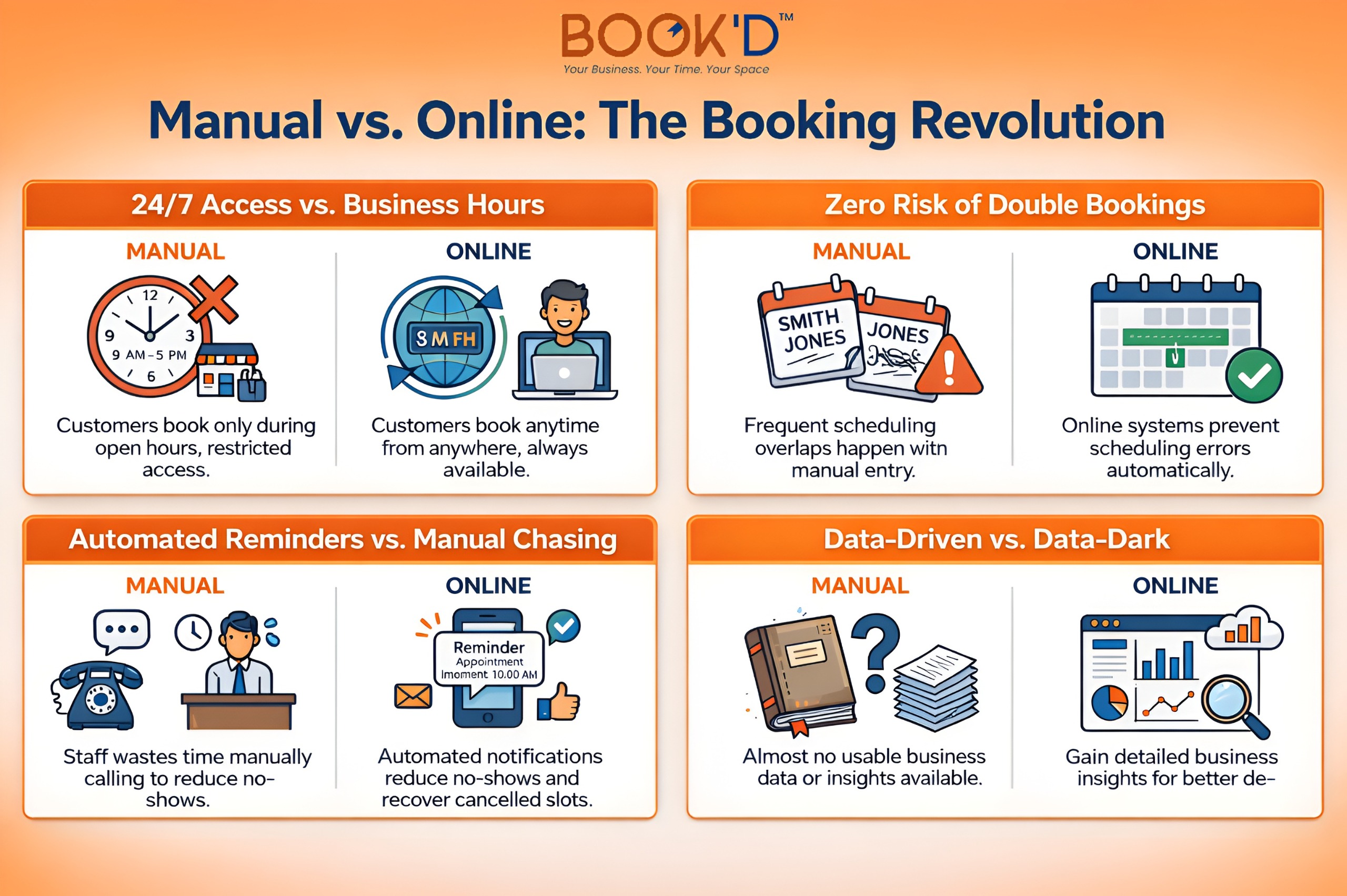
No-shows are where it gets expensive fast. Without automated reminders, clients forget. That’s just reality. And a forgotten appointment on a manual calendar is usually just a lost slot with no real way to recover it.
Small business booking software sends reminders without you lifting a finger, lets clients reschedule within rules you set, and keeps your day from falling apart over something that didn’t need to be manual in the first place.
The mental load is the part nobody talks about enough. When your schedule lives in your head and your text messages, you carry it everywhere. That particular kind of exhaustion is familiar to most solo operators, and it’s one of the first things that goes away when you hand the process off to a system.
What a Booking System Actually Does Day to Day
The practical side of appointment scheduling for small businesses is more straightforward than most people expect. Clients book when it suits them, whether that’s during your working hours or not.
A booking link doesn’t sleep. Your calendar stays accurate because everything runs through one place and updates in real time. Double bookings become nearly impossible. Confirmations and reminders go out automatically. Payments can be collected at the time of booking, which changes the entire dynamic around cancellations.
For anyone operating out of a salon booth rental or a rented studio, this matters in a specific way. Your time slot has a fixed cost attached to it. A no-show isn’t just an inconvenience; it’s money you’ve already spent on a space that sat empty. A system that collects deposits upfront and sends reminders automatically isn’t a luxury in that context. It’s just good business.
If you want to see the full operational picture, this guide on online appointment scheduling lays it out clearly.
Manual Booking vs. Online Booking
 What to Look For in Small Business Booking Software
Not every platform is built for the same kind of business. Here’s what actually matters at the small business level:
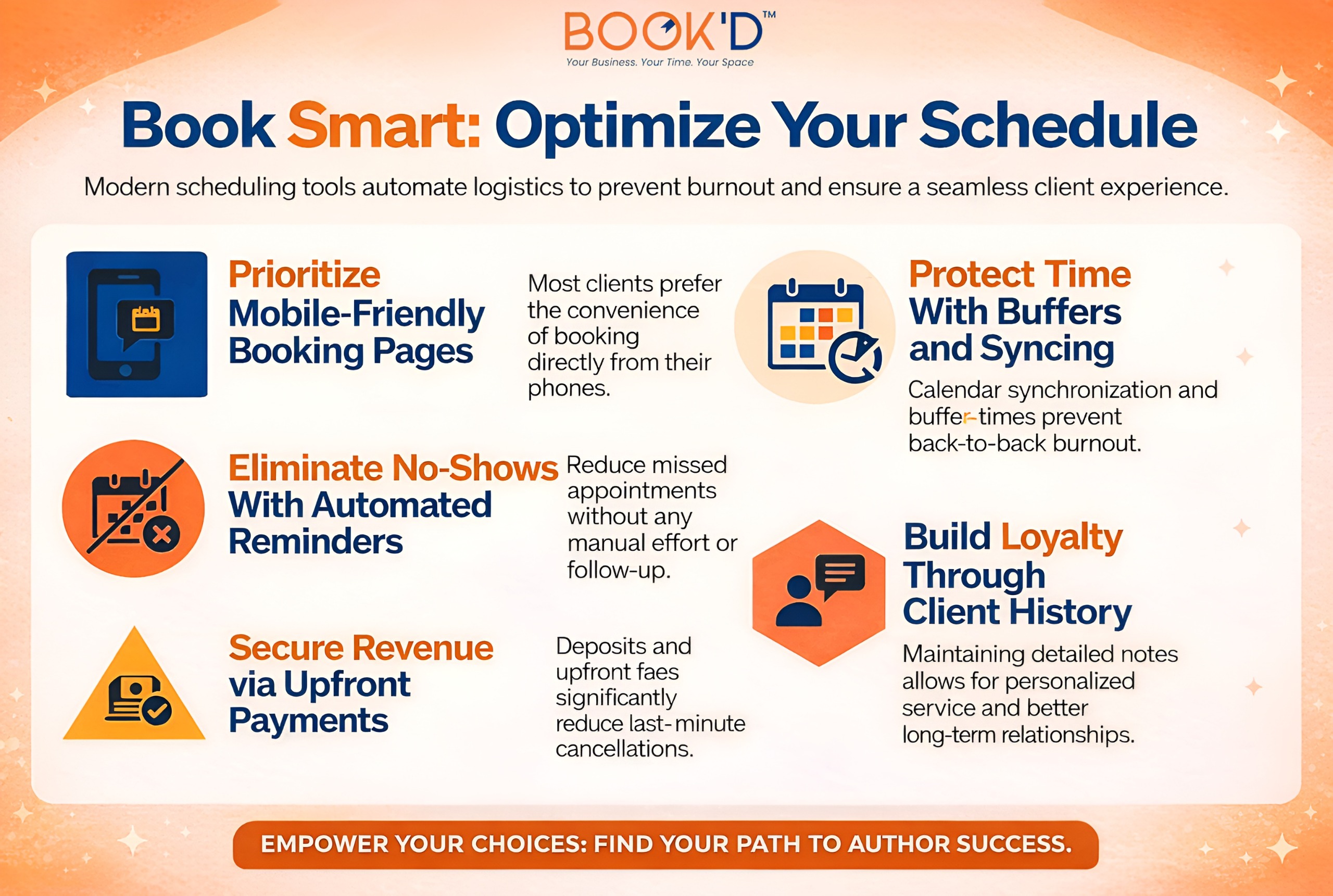 If you’re running something like a studio space for rent with multiple rooms or rotating availability, you also need the system to manage space conflicts, not just provider availability. That’s a layer most basic tools handle poorly, so it’s worth checking before you commit.
For a thorough breakdown of what separates a useful platform from a frustrating one, this blog on essential online booking system features is worth reading before you make a decision.
Who Gets the Most Out of Booking Tools for Entrepreneurs
Most service-based businesses benefit, but a few see returns faster than others. Beauty professionals working in private suites or rented chairs live and die by a full schedule. Every gap costs real money.
A booking system that’s easy for clients to use, sends reminders, and handles rescheduling without your involvement keeps that schedule as tight as possible without requiring constant management.
Health and wellness practitioners deal with recurring clients who need regular appointments. Automated rebooking reminders and easy self-scheduling keep those relationships consistent without a follow-up call every time.
Creatives and content professionals renting studio space by the hour often work with first-time clients who need a smooth, low-friction booking experience. Upfront payment, clear confirmation details, and a professional-looking booking page do a lot of the trust-building work before they’ve even walked in.
Coaches and consultants who sell defined blocks of time benefit from the simplicity alone. One link, sent anywhere, handles the whole process.
This guide on online booking system benefits is a good read if you want the broader picture across business types.
Getting Started Without Overthinking It
Most platforms take a day to set up and work immediately. The actual work is in the decisions: which services to list, what your availability looks like, how much notice you require for cancellations, and what your reminders say.
Do those things thoughtfully. Then test the experience as a client before you share the link. Book a fake appointment. Read the confirmation email. Make sure it represents your business the way you want it to.
After that, it mostly runs itself. Within a few weeks, most business owners stop thinking about scheduling as a task and start treating it as something that just happens. That shift is the whole point.
Final Thoughts
Manual scheduling isn’t a character flaw. Most small business owners start that way because it works at the beginning. The problem is that it doesn’t scale, and the cost of staying with it grows alongside your client list.
An online booking system won’t transform your business overnight. But it will give you back time you didn’t realize you were losing, reduce the no-shows that chip away at your revenue, and create a client experience that feels more professional without requiring more effort from you.
At Just-Booked, the belief is straightforward: independent operators deserve systems that work as hard as they do. This is one of the simpler upgrades available, and most people wish they’d made it sooner.
FAQs
What is the best online booking system for small businesses?
It depends on your industry and volume. Acuity, Calendly, Square Appointments, and Fresha are all solid options at different price points. The most important factors are how easy it is for clients to use and whether it integrates with how you already work. Most offer free trials, so test before you commit.
How much does booking software cost?
Free tiers exist and work well for simple setups. Paid plans typically run between $10 and $50 per month and unlock payment processing, staff accounts, and better customisation. Some platforms take a percentage of transactions instead, which adds up at higher volumes.
Can clients reschedule on their own?
Yes. You set the rules around how much notice is required, and clients handle their own changes within those boundaries. This alone removes a significant chunk of day-to-day scheduling messages.
Does online booking actually reduce no-shows?
Consistently, yes. Automated reminders sent 24 to 48 hours before an appointment are the single most effective no-show reducer outside of requiring deposits. Some data puts the reduction above 50% compared to no reminders at all.
Is it worth it for solo operators?
Especially for solo operators. Without a team to absorb admin work, every minute spent on scheduling is a minute taken from revenue. A booking system that runs confirmations, reminders, and rescheduling independently is the most accessible version of operational leverage most solo business owners will find.