


Here’s a situation most service businesses know well. It’s Tuesday evening. You’re done for the day or trying to be. Phone’s been going since 8 am, half the messages are people asking what times you have available, two of them want to reschedule something that was already rescheduled once, and somewhere in the middle of all that, there’s an actual job to do that’s been sitting untouched since lunch.
This is what running a service business looks like when booking is still manual. And the strange thing is how many businesses accept it as just how things are when the fix is genuinely not complicated.
Online booking system features have come a long way from basic calendar plugins that half-worked on mobile and confused more customers than they helped. What’s available now is fundamentally different, and for businesses still handling appointments by phone, text, and spreadsheet, the gap between where they are and where they could be is wider than most people realise until they actually look at it.
What a Booking System Actually Does Beyond the Obvious
Most people, when they think about online booking tools, think about the customer-facing part. Someone visits a website, picks a time, and confirms a booking. Simple enough. But the real value of booking software features sits mostly on the other side of that transaction in what stops the business from having to do it manually.
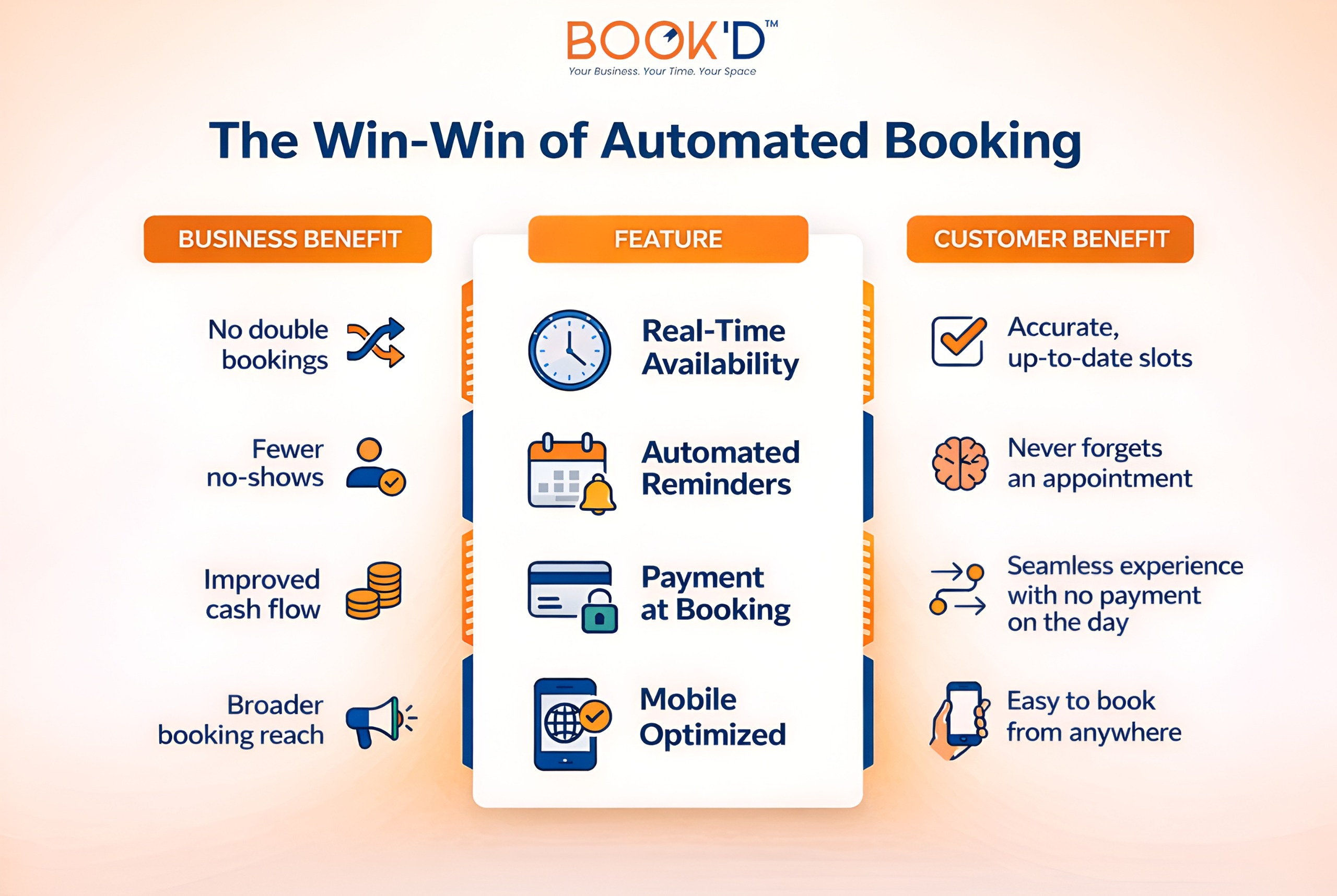
Real-time availability management means the calendar updates the moment a booking is made. No double bookings. No apologetic phone calls explaining that you accidentally gave the same slot to two people. No mental overhead of cross-referencing multiple places to figure out what’s actually free.
Automated reminders are the feature that businesses notice most immediately once they have them. Appointment no-shows are expensive, not just the lost revenue from that slot, but the fact that it was held, turned away other bookings, and then sat empty anyway. A well-timed automated reminder, sent by text or email without anyone having to think about it, reduces no-show rates substantially. Consistently. Across every industry that uses them.
Customer self-management matters too. The ability for someone to reschedule or cancel without having to call, wait for a response, and go back and forth over availability is not just convenient for the customer. It removes an entire category of admin from the business side. Every rescheduling conversation that happens automatically is one that doesn’t need a human to handle it.
The Scheduling Software Features That Actually Move The Needle
Not all booking software features are equal in terms of daily impact. Some are genuinely operational; they change how the business runs. Others are nice to have. It’s worth knowing the difference.
Calendar integration sits in the genuinely operational category. A booking system that talks to Google Calendar, Outlook, or whatever the business already uses means there’s one source of truth for availability. No checking multiple places. No accidentally leaving a gap you forgot was blocked out for something else. Everything in one place, updated in real time.
Payment processing built into the booking flow is more impactful than it sounds. Taking a deposit or full payment at the point of booking doesn’t just help cash flow; it changes the commitment level of the booking. People who’ve paid don’t no-show at anything like the rate of people who haven’t. That alone makes it one of the most valuable scheduling software features available.
Custom booking forms let businesses capture what they actually need before someone arrives. For a consultation-based service, that might be background information. For a specialist appointment, it might be intake details. Whatever it is, having it in advance means the actual appointment time gets used properly instead of being spent gathering information that could have arrived ahead of time.
For a proper look at how these features translate into real operational and growth outcomes, this guide on 10 ways an online booking system helps covers the business case in detail, which is worth reading if you’re weighing up whether the switch makes sense. What Clients Actually Experience on Their End
It’s easy to think about booking systems from the business perspective, the admin reduction, the automation, and the calendar management. But the customer experience side matters just as much, and often more, for whether a booking system actually drives growth.
The expectation has shifted. A significant and growing portion of people actively prefer to book online rather than call, and not just younger demographics. The preference for self-service booking is broad, consistent, and still growing. A business without online booking isn’t just creating friction. It’s actively losing bookings to competitors who make the process easier.
Mobile optimisation isn’t optional anymore. Most bookings happen on phones. A booking flow that’s clunky, slow, or awkward on mobile doesn’t just create a bad experience; it creates abandoned bookings. People don’t persevere with a frustrating process when there’s an easier alternative one search result away.
Instant confirmation matters psychologically. The moment someone completes a booking and receives an immediate confirmation email, text, or both, the anxiety around whether it actually went through disappears. It sounds minor. It genuinely affects how confident and positively disposed a new customer feels toward a business before they’ve even arrived.
The Benefits
The Time Question: Where the Hours Actually Go
One of the things that’s hard to quantify before implementing a booking system and immediately obvious after is how much time manual booking management actually consumes.
It’s not just the calls. It’s the mental load of keeping track. The follow-up texts to confirm things that were booked three weeks ago. The back and forth when someone needs to move something. The time spent at the end of each day reconciling what’s actually on tomorrow’s schedule.
None of these things individually feels enormous. Collectively, across a working week, they add up to hours that exist inside every other task the day is supposed to contain.
Online appointment scheduling removes most of that category of work entirely. Not reduce it. Remove it. The system handles confirmation, reminder, rescheduling, and cancellation without a human in the loop. Which means the humans in the business can be doing work that actually requires them.
For businesses with staff, that multiplies. Every team member spending forty minutes a day on booking admin is a meaningful operational cost, one that scales directly with headcount and directly with how busy the business gets.
The busier things are, the worse the manual booking problem becomes, which is precisely the wrong relationship for a growing business to have with its own admin.
This piece on how online appointment scheduling saves time gets into the specifics of where those hours go and what reclaiming them actually looks like in practice. What to Actually Look For When Choosing
The online booking tools list available to businesses now is genuinely long. This makes the question less about whether to implement a system and more about what actually matters when choosing one.
Ease of setup matters more than it gets credit for. A system that takes weeks to configure and requires ongoing technical maintenance isn’t solving an admin problem; it’s replacing one with another. The best booking software features are the ones that work without the business having to become an expert in operating them.
Integration matters. Does it talk to the calendar already in use? Does it connect to the payment processor already set up? Does it fit into the existing workflow rather than requiring the workflow to reshape around it?
The customer-facing experience matters. It should look like part of the business, not a bolt-on third-party widget with different branding and a different visual language. Trust is built or lost at every touchpoint, and the booking process is a significant one.
Support matters, especially early on. Questions come up. Things need configuring. A booking system provider that’s genuinely reachable and helpful when something isn’t working is worth considerably more than one that isn’t.
Discover the tools and features that make Just-Booked perfect for scheduling.
The Honest Summary
Manual booking management works in the same way that doing everything by hand technically works. It’s just slow, expensive in time, prone to human error, and increasingly out of step with what customers expect when they’re trying to give a business their money.
Online booking system features have reached a point where the setup is straightforward, the cost is reasonable, and the operational benefit is immediate and measurable. Fewer noshows. Less time on the phone. A better customer experience from the first touchpoint. A calendar that manages itself instead of requiring constant human supervision.
For service businesses still on the fence about making the switch, the question worth asking isn’t whether it’s worth it. It’s why it hasn’t happened yet.
FAQs
- What features should an online booking system have?
Real-time availability, automated reminders, payment processing, calendar integration, and mobile optimisation are the core ones. Custom intake forms and easy rescheduling round out what most service businesses actually need day to day.
- How does online booking reduce no-shows?
Automated reminders sent by text or email before appointments keep bookings front of mind without anyone having to chase manually. Taking payment at the point of booking also significantly reduces no-show rates because the financial commitment is already made.
- Is online booking actually better for customers?
Consistently, yes. Most people now prefer to book without having to call, and the expectation of being able to do it from a phone, at any time, is increasingly standard. Businesses that make booking easy convert more enquiries into confirmed appointments.
- How much time does a booking system actually save?
More than most businesses expect before they implement one. Confirmation, reminders, rescheduling, and cancellation handling happening automatically removes a category of work entirely, not just reduces it, which adds up to meaningful hours across a working week.
- What should I look for when choosing booking software?
Ease of setup, integration with existing tools, a clean customer-facing experience, and genuine support when you need it. The best system is the one that works without requiring the business to spend significant time maintaining or managing it.